

A busy dining room can hide an inefficient business. Orders may be coming in, but staff are still correcting kitchen tickets, managers are checking stock manually, and the owner cannot explain why a strong sales day produced a disappointing return.
Restaurant management software can help by connecting the information behind those decisions. Depending on the platform and its configuration, it brings together ordering, kitchen communication, inventory and reporting. Its value comes from making everyday work easier to control and giving managers reliable records to act on.
For restaurant owners in the UAE, the starting point should be their own service model. A neighbourhood café, a delivery kitchen and a restaurant with several branches have different priorities. Choosing well means testing how the software handles those priorities during a real shift.
Start with the gaps between teams
Before comparing products, follow one order from the customer to the closing report. Where is information entered twice? When does a waiter need to repeat an instruction? Who updates availability when an ingredient runs out? These handovers reveal the problems a system needs to solve.
For example, imagine a guest orders a burger without cheese. If that instruction stays on the waiter’s notepad, the kitchen may prepare the standard item. The restaurant then loses ingredients and preparation time while the guest waits. A clearly configured modifier that reaches the correct kitchen station helps address that specific failure.
Write down three recurring problems and use them as demonstration scenarios. This gives the purchasing decision a practical foundation instead of allowing a long feature list to determine it.
Make order changes visible to the kitchen
Good order handling includes what happens after a ticket is sent. Guests add items, change quantities or cancel a dish. Staff need to see which version of an order is current and whether preparation has already begun.
During a demonstration, send food and drinks to separate preparation areas. Then amend the order. Check how the change appears, who acknowledges it and whether the original ticket remains visible. Repeat the exercise with a cancellation and a refund.
Also check the physical setup. A readable kitchen display, sensible printer placement and clear item names matter as much as the ordering screen. Software cannot compensate for instructions that staff cannot see or understand during service.
Connect stock records to actual ingredient use
Recording a sale does not automatically explain what happened to the ingredients. Restaurants evaluating inventory features should establish whether the system tracks finished items, individual ingredients or both, and whether recipe deductions require a separate module.
Consider an illustrative example: a standard portion uses 200 grams of an ingredient. Selling 50 portions implies 10 kilograms of expected usage. If the physical stock count suggests 12 kilograms were used, the two-kilogram difference needs investigation. It could reflect portion variation, spoilage, unrecorded meals or a receiving error.
The difference is a signal, not proof of its cause. Useful inventory routines combine accurate recipes, consistent units, recorded deliveries and regular physical counts. Managers should also record waste when it happens, with a reason, rather than trying to reconstruct it at the end of the week.
Use reports to answer specific operating questions
A dashboard becomes useful when it leads to a decision. Start with questions such as which dishes are frequently cancelled, when kitchen delays increase and whether a popular menu item still leaves enough after its direct costs.
Treat sales revenue and profit as different measures. Delivery commissions, packaging, discounts and ingredient costs can change the contribution of an order. Labour, rent and other operating expenses still need to be considered before drawing conclusions about overall profitability.
Choose a small set of reports that managers will review consistently. For each one, define who checks it, how often and what would trigger action. A weekly review of stock differences and cancellations may be more valuable than dozens of reports that nobody uses.
Check suitability for the UAE operation
Test the languages your team actually uses, including menu text and printed receipts. Ask to see how your required tax settings and invoice fields are configured, then have the responsible accounting person review sample transactions. A marketing claim alone does not establish that the setup meets your business requirements.
Confirm compatibility with existing terminals, printers and kitchen displays. If delivery channels or accounting tools are essential, ask the provider to demonstrate the exact connection you need and explain any additional charges.
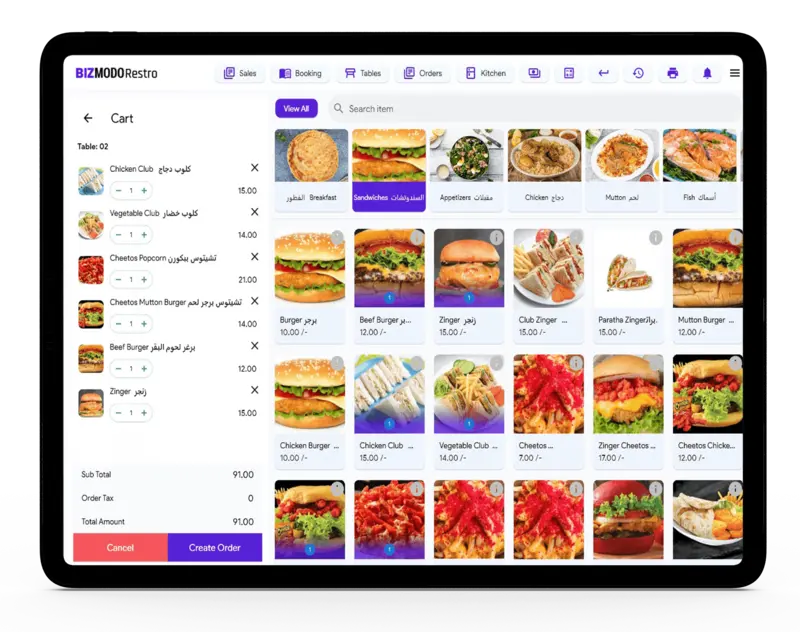
One option to assess is BizModo’s restaurant management software. Its restaurant product page lists kitchen displays, order modifiers, inventory tools, QR ordering and multi-location management. Use those published features as a starting point, then verify the scope of the proposed package with your own menu and service scenarios.
Test reliability and access before committing
Ask what happens when the internet connection drops. Can staff continue taking orders? Will kitchen tickets still arrive? Which payment functions remain available? Request a demonstration of both the interruption and the recovery, including how duplicate or missing records are prevented.
Review staff permissions with the same care. A cashier, kitchen employee and manager may need different access. Check who can issue refunds, change prices, export customer records and view financial reports. Individual accounts make it easier to review actions than a shared login.
Finally, request a written cost breakdown covering subscriptions, hardware, setup, training, integrations and support. Ask how data can be exported if the restaurant later changes providers. These details are part of the buying decision, even when the demonstration looks convincing.
Introduce the system through a controlled pilot
Prepare the menu, modifiers, prices, recipes and opening stock before launch. Assign someone to check the data and give each role practical training using the tasks they perform during service.
Pilot the system in one outlet or a limited service period where practical. Record a baseline for order corrections, closing time and stock discrepancies, then compare similar periods after implementation. Note staffing and menu changes so they are not mistaken for software effects.
The right restaurant management software should help the team handle orders accurately, explain stock movements and make better operating decisions. Choose it by following your busiest shift from start to finish. Then support it with clean data, clear responsibilities and regular review.